
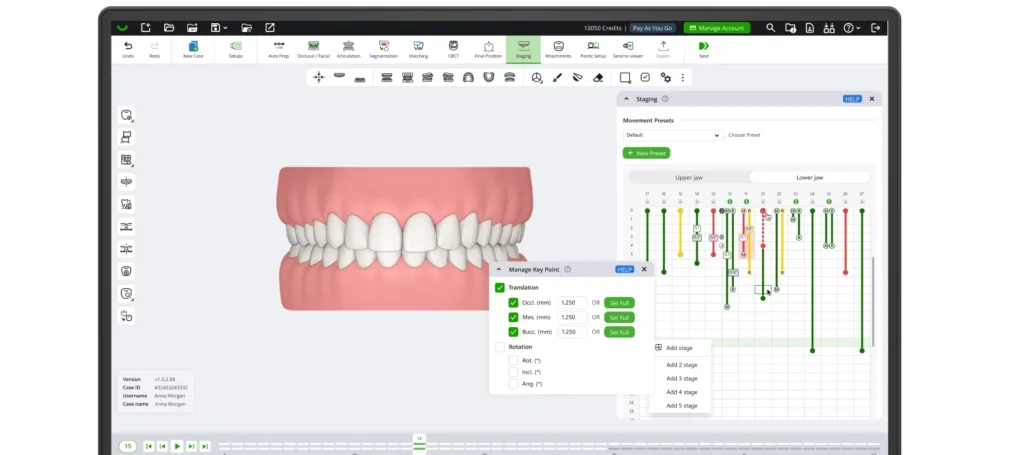
SmileInspector Application

Plan faster, keep full control

Auto Prep readies the model in one click. AI Final Position proposes a final position you can refine per tooth. Staging applies automatically. Nothing is locked.

Cleared by the FDA

From intraoral scan to production-ready models, in one browser window

SmileInspector is clear aligner treatment planning software that runs in the browser. Import intraoral scans and CBCT, prepare the model, plan the case, and export production-ready models. Every automated result can be reopened and changed.

Auto Prep. Model prep in under a minute.

One click runs the four preparation steps that come before planning, and the result is a model ready for final-position planning. The part of every case that never varies stops taking time from the planning that matters.

Occlusal facial setup
Articulation
Crown segmentation
Matching

Three routes to the final position

The final position is the clinical heart of the case, and the application never forces one route to it.

The AI proposes. You refine. Nothing is final until you approve it.

By hand

The full manual toolset. Move individual teeth or the whole arch form, with anatomical checks as you work.

With smart tools

Move faster on routine cases while keeping symmetry, midline, and occlusion within tolerance.

With an AI proposal

AI Final Position proposes a final tooth setup that is refinable per tooth. You change anything you want before approving it. In beta, available to selected users.

Staging applies automatically, then you shape it

Apply a staging strategy and the case stages automatically. From there the timeline is yours: movements separate by type, so rotation and translation are controlled independently and you decide how each tooth travels. Adjust sequence, direction, and timing move by move, place attachments from your own library, and plan IPR at the final position with control over the exact stage where reduction happens.

Staging timeline interface

From approved plan to production-ready models

Share the plan for review in the browser. Whoever reviews it comments, adjusts the final position, attachments, and IPR, then approves, and staging stays with whoever planned the case. Export stage-by-stage STL with auto trimlines, editable trimline points, optional engraving, and filler geometry for thermoforming, ready for direct printing or thermoforming wherever you produce today.

Export interface

Who decides what, phase by phase

Automation belongs on the work that repeats every case. Clinical judgment stays with the person accountable for it. Here is the split.

Phase
The software
You
Prepare
Runs all four prep steps in one click
Reopen and adjust any step
Final position
Offers manual tools, smart tools, and an AI proposal in beta for selected users
Set, change, or discard the result
Attachments and IPR
Nothing automatic, by design
Place attachments, plan IPR, choose the exact stage for reduction
Staging
Applies the staging strategy and stages the case
Change any movement, its order, and its timing
Review
Delivers the plan for review
Approve or send it back
Export
Generates production-ready files
Decide what ships

No step is a black box.

Fits the workflow you already run

Fully cross-platform

A web application that runs in any modern browser, on Mac, Windows, or Linux, with nothing to install.

Scanner-agnostic

Upload intraoral scans as STL, PLY, or other common formats. Exported STL drops into the printer or thermoforming workflow you run today.

Portal, Doctor Viewer, Patient Viewer

Manage cases and team access in Portal, send a doctor a link to review and approve, and send a patient a link showing the proposed result. Both viewer links are generated here, on any case.

CBCT in the same window

AI CBCT segmentation, aligned to the intraoral scan, so you see where the roots sit inside the bone while setting the final position. No external software.

Open API

Create cases, move case data, and connect the workflow to systems you already run.

See the full capability list on How it works.

What Dental Labs & Orthodontists say

Vladimir Lucenko
Vladimir Lucenko

R&D & Operations

10
Fits your systems, ERP included
Adekoye Ogunro
Adekoye Ogunro

Clinical Director

8
SmileInspector combines user-friendly aligner planning with outstanding support from day one.
Vladimir Lucenko
Vladimir Lucenko

R&D & Operations

7
SmileInspector helped our dental lab achieve faster planning without losing hands-on control.
Trịnh Trần Phú
Trịnh Trần Phú

Professional Director, X-aligner (Vietnam)

6
SmileInspector provides highly accurate segmentation with fast, stable web-based performance.

FAQ

Does the AI plan the case for me?

No. Auto Prep handles model preparation, and AI Final Position, a beta feature available to selected users, proposes a final position to save time. You review, change any movement, and approve every case.

It is one-click AI for the four preparation steps that come before planning: occlusal facial setup, articulation, crown segmentation, and matching. Any of the four can be reopened and adjusted later.

Yes. The full manual toolset is the foundation of the application, and the automation sits on top of it. Every movement, attachment, and IPR decision stays yours.

Yes. Apply a staging strategy and the case stages automatically, then the timeline is yours. Movements separate by type, so rotation and translation are controlled independently, and sequence, direction, and timing are adjustable move by move.

SmileInspector is a fully cross-platform web application, running in any modern browser on Mac, Windows, or Linux with nothing to install. Cases are stored in the cloud and transferred over encrypted connections, access is limited to your team and the doctors you share with, and we never use your case data to plan for anyone else.

No. CBCT is optional, and the application works from intraoral scans alone. Adding CBCT gives you AI segmentation aligned to the scan, so you can see where the roots sit inside the bone while setting the final position, in the same browser window.

Yes. Upload intraoral scans as STL, PLY, or other common formats, and the exported STL drops into the printer or thermoforming workflow you run today. Nothing about the application ties you to one hardware vendor.

Yes. Export stage-by-stage STL with auto trimlines, editable trimline points, optional engraving, and filler geometry for thermoforming, ready for direct printing or thermoforming.

Related: For Orthodontists · For Dental Labs · Portal · Doctor Viewer · Patient Viewer · How it works

Held out of the eight: how to get AI Final Position beta access, who controls the final position during doctor review, working a case at the same time as a colleague, the API, FDA clearance. The last two are stated in page blocks 7 and 8. The beta access question is the strongest swap candidate, since questions 7 and 8 both cover output.

Try SmileInspector for free.